What a WordPress audit clarifies before a relaunch
A WordPress website audit examines an existing WordPress site for architecture, content, integrations, operations, and SEO. Before a relaunch, it clarifies what can stay from the old website and what has to be built new. Budget and timeline depend on it.
When you plan a relaunch, you usually already have a picture of the result in mind. The route there sometimes leads through a full rebuild, sometimes through a staged rework, a system change, or targeted repairs while the site keeps running.
At 360VIER, we sort the findings of an audit by risk and mark the few points on which the relaunch decision hinges. What we look at and how a finding turns into a decision, we show further down with an anonymized case.
At a glance
- A WordPress audit examines the architecture, content, integrations, operations, and SEO of an existing website.
- Before a relaunch, it shows whether repair, a staged rework, migration, or a full rebuild is the right path.
- The expensive risks sit in page builders, outdated plugins, forgotten integrations, and URLs with backlinks.
- Every finding gets a priority based on the damage it causes and its weight for the decision.
- WordPress recommends specific PHP versions. According to WordPress, older PHP versions have reached their official end of life.
Why the audit comes before the relaunch quote
Anyone who budgets a relaunch without knowing the old website is working with assumptions. Every wrong assumption comes back later as extra cost. Typical cases are a CRM connection that was on nobody’s list, or a plugin whose data can only be moved by hand.
That is why every website relaunch with WordPress at 360VIER starts with an inventory. When we take over an existing website, it begins with a technical check of the WordPress and PHP version, theme, plugins, hosting, security, and load time. The preliminary phase of a project typically takes four to six weeks, after which we set the schedule firmly.
The audit also helps inside your own company. Marketing, IT, and executive management see the same findings and decide on the same basis.
Where the architecture of a grown WordPress site holds you back
We look at the theme, the editor, and the data model first. They determine whether new page types and features can be built on the existing foundation.
- Theme: Does the website run on a purchased standard theme, a custom-developed theme, or the child theme of a theme that has been waiting for updates for years?
- Editor: Are pages built in the block editor with custom blocks, or in a page builder such as Elementor or WPBakery? Content from page builders sits in shortcodes and special formats that cost manual work during a move.
- Data model: Do products, locations, people, or job postings exist as their own content types with fields, or as formatted text pages?
- Versions: In its system requirements, WordPress recommends PHP 8.3 or newer (as of 2026). Older versions still work, but according to WordPress they have reached end of life and can leave the website open to attack.
- Languages and multisite: How are language versions linked, for example through WPML or Polylang, and do several websites share one installation?
A page builder only becomes a problem when every new page has to follow the old pattern. The effort then grows with every page, and the website gets harder to change each month. What a clean content model with roles and interfaces looks like is described on the WordPress architecture page.
Which content is worth the relaunch?
For content, the audit asks which pages bring visitors, inquiries, or backlinks today and who maintains them. Search Console delivers clicks and impressions per address, and a backlink tool adds the referring domains. Pages with rankings get a fixed place in the new structure. Pages without views, backlinks, or a business purpose, you merge or remove.
How large such inventories can get is shown by the platform of Lernstudio Barbarossa. For more than 165 studios, we reorganized more than 22,000 subpages there. At that scale, the structure of the content decides the effort, and the number of pages matters less.
Who maintains the content counts at least as much. Is there a responsible person for every area, or does an assistant maintain everything on the side? A relaunch that introduces more page types than the editorial team can maintain creates the next outdated website right away. How an inventory becomes a mapping for the move is explained in our CMS migration checklist.
Which integrations run in the background of the website
Integrations easily slip through an inventory because they work invisibly in the background. A form sends inquiries to the CRM, product data comes from the PIM, job postings from applicant management such as Personio. For every connection, the audit asks the same questions.
| Question | Why it matters |
|---|---|
| Which system is the leading one? | determines where data is maintained and where it flows |
| In which direction and at what interval does data flow? | sets the effort and test cases for the rebuild |
| What happens when the connection fails? | shows whether inquiries get lost unnoticed |
| Who looks after the other side? | clarifies access, test environments, and contacts |
At KAMPMEYER Immobilien, the listings come from the real estate software onOffice and appear in the property search of the WordPress platform. If the data format changes during a relaunch, prospects see empty lists. Dependencies like this belong in the audit and in the project plan. How we connect websites to CRM, ERP, and industry software is described on the API integrations page.
How secure day-to-day operations are today
Operations show who looks after the website day to day and how quickly it runs again after an error. The WordPress core itself is well maintained. Risks arise mainly from many plugins, missing updates, and unclear responsibilities.
- Updates: Who installs them, how often, and is there a staging environment where they are tested first?
- Plugins: How many are active, which ones still receive updates, and which ones do the same job twice?
- Backups: Has a restore ever been rehearsed? In an emergency, a backup only helps if someone can restore it.
- Load time: How fast do the most important pages load on a smartphone, and which plugins or scripts slow them down?
- Hosting: Where does the website run, who has access, and are the resources enough for traffic peaks during campaigns or trade shows?
- Access: Which accounts belong to former employees or earlier service providers?
You can fix many of these findings before the relaunch and independently of it. That lowers the risk immediately and relieves the project. How we organize updates, backups, and ongoing development day to day is covered on the WordPress maintenance and support page.
Which SEO signals have to survive the relaunch
For SEO, the audit mainly cares about what can get lost in the relaunch. That includes addresses with clicks or backlinks, titles and descriptions, structured data, and internal links to important pages.
A crawl finds the pages in the menu. Addresses from old campaigns or with backlinks often only show up in the XML sitemap and Search Console. Every relevant address needs a content counterpart in the new system and a 301 redirect. In its guide to site moves, Google advises keeping redirects in place for at least one year.
Since AI assistants such as ChatGPT or Gemini compile answers from websites, we also check whether they can read the content. According to Google’s page AI features and your website, the same SEO basics apply to Google’s AI Overviews and AI Mode as to the rest of search. Google lists no additional technical requirements and recommends providing important content as text. The audit therefore records whether key statements exist only in images or PDF files. How content becomes understandable for people and search systems alike is shown on the AI-first websites page.
How the findings of an audit become a sequence
A thorough audit delivers more findings than a project can solve at once. We rank every finding by the damage it causes if it stays. Then we ask whether the relaunch decision hinges on it and whether it has to be done by go-live.
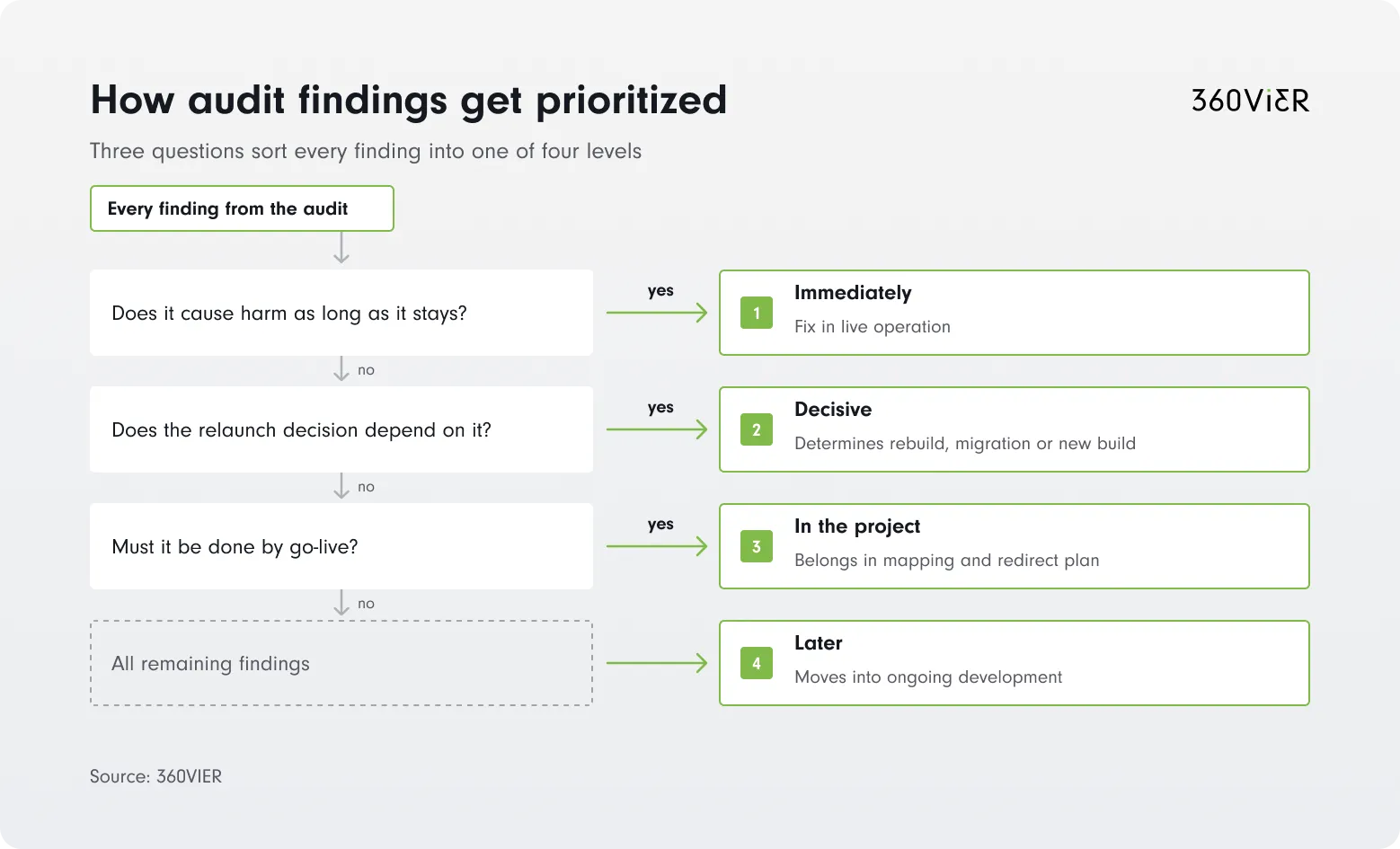
| Priority | Typical findings | What follows |
|---|---|---|
| Immediate | Plugin with a known security vulnerability, outdated PHP version, restore never rehearsed | fix during live operation, independent of the relaunch |
| Decisive | Page builder as the only way of building, content without a data model, integration with unclear data flow | determines whether rework, migration, or rebuild |
| In the project | URLs with backlinks, metadata, forms, and tracking | belongs in the mapping and redirect plan |
| Later | Load time of individual pages, design details, content with few views | moves into ongoing development or the editorial plan |
Without a sequence, the team spends weeks debating colors and imagery while an unpatched plugin keeps running. With one, you close the security hole first, and the design gets the time it needs afterward.
An anonymized finding from a WordPress audit
We anonymized the following case from our work. The context comes from the project.
Starting point. A software company runs its website on WordPress in German and English. The pages have grown over the years with a page builder. For new products, marketing needs its own pages quickly, while plugin load and maintenance effort keep rising.
Finding. The effort sits in how the pages are built. Every new page is created in the page builder as a one-off, layout extensions arrive as additional plugins, and the content sits in a format that can only be moved into another structure by hand.
Decision. The company reworks the website in stages within the existing WordPress. The foundation is a module system with custom blocks for the Gutenberg block editor. Every new page is built with it from now on. Existing pages follow in stages, starting with those that need the most change, such as product pages.
Status. The website stays online and usable for marketing during the rework. The changeover happens in stages.
With this finding, the question in the project shifted. “When do we start the relaunch?” became “Which page do we convert next?” For a marketing team that has to explain new products all the time, that is the shorter path to better pages. A staged rework fits when content and hosting are solid and the problem lies in how the pages are built.
Repair, rework, migrate, or rebuild
The prioritized findings point to the path for the project. Many projects combine two paths, for example a system change with a careful revision of the design.
| Path | When it fits | Typical finding |
|---|---|---|
| Cleanup in operations | Structure, content, and build approach fit, the risks lie in operations | outdated plugins, no staging environment, open access |
| Staged rework | Content and hosting are solid, the way pages are built holds things back | page builder as the only way of building, no module system |
| Migration | Structure and content fit, the system or its generation no longer does | old CMS, theme without updates, extensions at the end of their life cycle |
| Relaunch | Structure, content, and goals have drifted apart | page structure follows the org chart, audiences cannot find their questions |
A migration swaps the technology underneath the website, while page structure and content stay largely intact. How we move websites from TYPO3, Contao, Joomla, or older WordPress installations is explained on the website migration page. A relaunch is the right answer when structure, content, and goals have drifted so far apart that every repair only treats the symptom.
Frequently asked questions about the WordPress audit
How 360VIER audits and develops WordPress websites
360VIER is a digital agency based in Groß-Umstadt near Frankfurt and Cologne. Since 2012, we have developed websites and portals for B2B companies on WordPress, Payload CMS, and HubSpot CMS. Before every relaunch and every takeover, we examine a website using this pattern. What we develop and maintain on WordPress is summarized on the WordPress agency for businesses page.
From Groß-Umstadt, we are quickly in Frankfurt and the Rhine-Main region, for example for workshops or a joint review of the findings. Examples from the region are the accessible WordPress platform of ABG FRANKFURT HOLDING and the relaunch of EULER GROUP with 13 locations. More on projects from the region is on the web design in the Frankfurt area page.

Have your WordPress website audited
Tell us what your website can do today and what it should deliver in the future. Hans Mengler will tell you which audit makes sense before the next step.